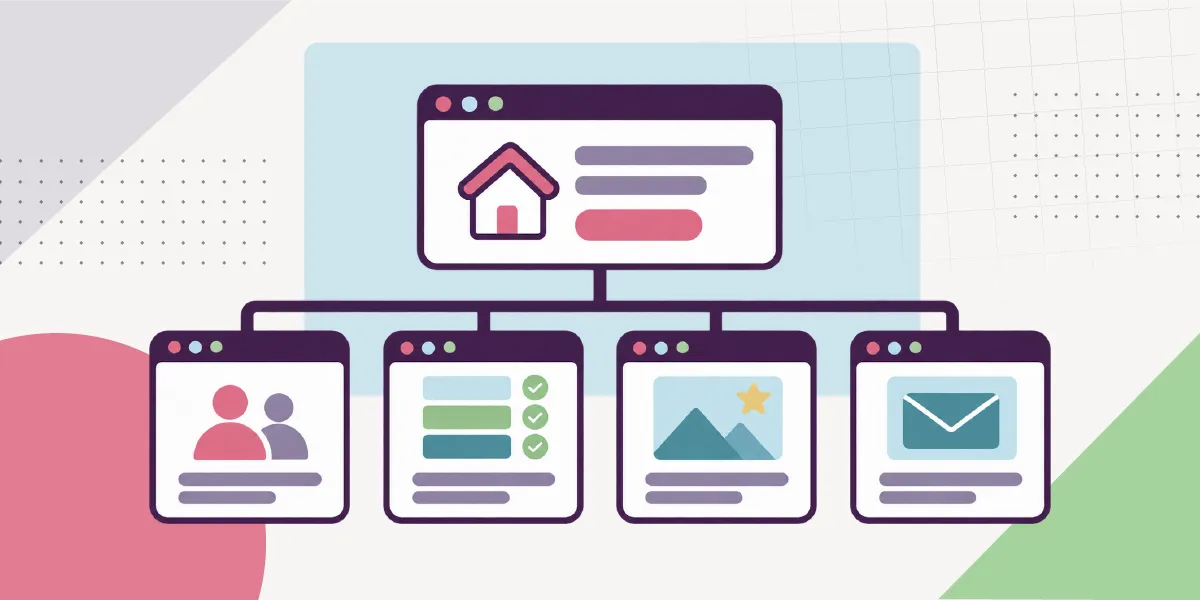
Most small businesses need five core pages: Home, About, Services, Work (or some other form of proof), and Contact. That’s it to start. A focused five-page site almost always outperforms a sprawling fifteen-page site, because every page has a clear job and nothing important gets buried.
The core five
This is how each page earns its keep, and when it makes sense to add more.
| Page | Its job | The one thing it must do |
|---|---|---|
| Home | Orient visitors and route them | Say what you do and for whom, fast |
| About | Build trust | Show the humans behind the business |
| Services | Explain what you offer | Describe outcomes, not only tasks |
| Work / Proof | Prove you can deliver | Show real examples or testimonials |
| Contact | Convert interest into a conversation | Make reaching you effortless |
What makes a good homepage?
Your homepage is not a summary of everything. It’s a router. A good homepage does four things, in roughly this order:
- States what you do and who it’s for in the first screen. Plain language wins. “Bookkeeping for Vancouver restaurants” tells people more than any slogan.
- Offers a clear next step. One prominent button: book a call, get a quote, see the menu of services.
- Shows a little proof. A testimonial, a client logo strip, or a photo of recent work.
- Routes people onward. Short teasers that lead to your Services, About, and Work pages.
If your homepage does those four things, it’s doing its job. Resist the urge to cram your whole story onto it.
Why do I need an About page?
Because people hire people. The About page is consistently one of the most visited pages on small business sites, and it’s where visitors decide whether they like you. Skip the mission-statement boilerplate. Instead: who you are, how long you’ve been at it, what you care about, and a real photo. Two hundred warm words beat eight hundred corporate ones.
Services: one page or several?
Start with a single Services page that lists what you offer, with a short paragraph for each. Split services onto their own pages when either of these becomes true:
- A service deserves its own search audience. If people search “wedding photography Vancouver” and “corporate headshots Vancouver” separately, those services deserve separate pages. Google generally ranks a focused page above a paragraph on a general one.
- A service needs more explanation than a paragraph allows. Pricing structure, process, FAQs specific to that service.
Individual service pages are one of the best SEO investments a small business can make, but only when there’s enough to say. A thin two-sentence page helps nobody.
What counts as a Work or Proof page?
Portfolios aren’t only for designers. Every business has some form of proof:
- A contractor has before-and-after photos
- A consultant has case studies or client results
- A shop has product highlights and reviews
- A service business has testimonials with names attached
If you’re brand new and have no past work to show, a page of testimonials, credentials, or even a detailed “how we work” walkthrough can stand in until you do.
Do I need a blog?
Only if you’ll write it. A blog is one of the best long-term ways to bring in search traffic, because it lets you answer the questions your customers are already typing into Google. But a blog with two posts from 2022 quietly signals that the lights are off. Our rule of thumb: add a blog when you can commit to at least one useful post a month, and not before. The same goes for a News page. If your organization has genuine news a few times a year (associations and non-profits often do), it’s worth having. Otherwise skip it.
When does an FAQ page make sense?
When you find yourself answering the same questions by email over and over. Pricing questions, timelines, what areas you serve, what to bring to an appointment. An FAQ page saves you time, helps hesitant visitors get unstuck, and tends to match how people phrase things in search. If you only have three questions, fold them into the relevant service page instead.
Pages you probably don’t need yet
A few pages that new site owners often ask about and rarely need on day one: a separate Testimonials page (put them where the selling happens instead), a Resources page, a Careers page if you’re not hiring, and a Gallery separate from your Work page. Every page you add dilutes attention from the pages that convert.
How we approach this at Eggbeater
Page planning is the very first design decision we make during a website project, before anything visual happens. In the Discover phase of our 4D process, we build a sitemap with you: a simple diagram of every page and how they connect. Then we wireframe the key pages so you can see what content each one needs before we design a single screen. It sounds unglamorous, but a solid sitemap is what keeps a website project on budget, because nobody discovers a missing page halfway through the build. Most of the small business sites we create start at those core five pages, with room to grow.
Not sure what your site needs?
If you’re planning a new site or wondering whether yours has the right pages, we’re happy to talk it through. A quick conversation about your sitemap costs nothing and usually saves a lot.
Learn more about our web design services here.
Still have questions?
Do I need a separate landing page for advertising?
Should my contact page have a form or an email address?
Do I need a privacy policy page on my website?
How much does it cost to add a page to my website later?
Can a one-page website work for a small business?
What do I need to prepare before a website project starts?
Before a website project starts, prepare a list of the pages you think you need, the content you already have for each, your logo files, a few sites you admire and a budget range. The studio refines the page list with you in the sitemap stage, so a rough draft is enough. Our post “What Do I Need Before Building a Website? A Small Business Checklist” covers the full list.
…and if you’ve still got questions, let us know!